
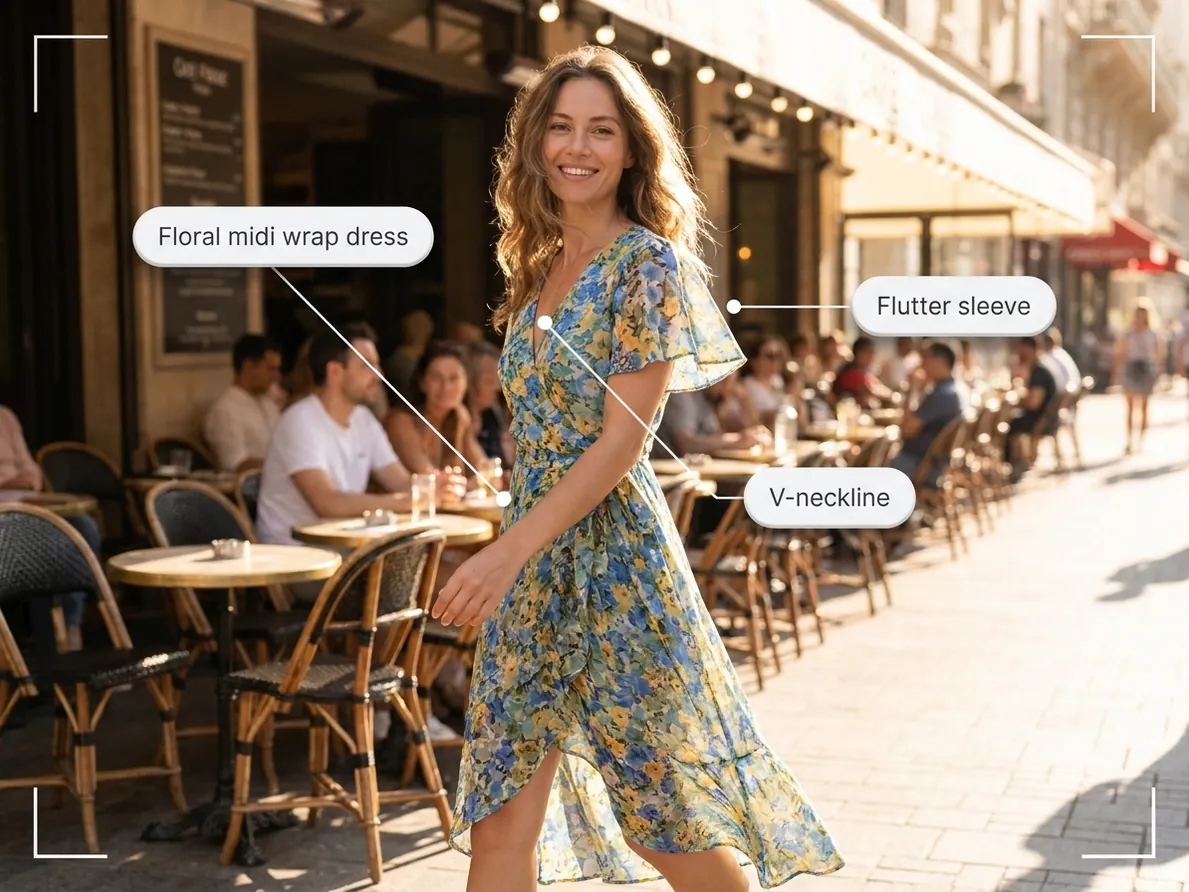
Start with the best copy of the photo
Before you search anything, hunt down the sharpest version of the image. A screenshot of a screenshot loses detail every round, and compression smears exactly what a search needs: print, seams and hardware. If the photo came from a post, open the full image instead of the preview and save the highest resolution you can get.
Skip filters. Heavy editing, AI touch-ups and warm lighting can change color and proportions enough to send a search toward the wrong dress. Lighting alone can make black look navy and ivory look white, so do not trust the hue you see on screen. If the picture looks mirrored, flip it back first. A reversed logo or a flipped asymmetric hem will confuse a match.
Look at the date, too. A dress in an old photo may be discontinued, and that changes the plan. You would be hunting through resale listings and archived retailer pages, not this season's catalog.
Want a quick description of the garment before you start? The scanner above can give you one from your photo. It names the dress details it can see and rates its own confidence. It does not search stores, so the shopping part is still yours.
How to crop a photo so a search can use it
Cropping does most of the work. Feed a search the whole screenshot and it may match the background, the shoes or the person standing next to the wearer. Cut the dress out as tightly as you can, with no faces, no bystanders and no other clothing.
Then make a few extra crops, each for one job.
- The whole dress, for silhouette and length.
- The neckline and sleeves, close up.
- The print or fabric, filling the frame.
- Any label, watermark, product code or caption.
- Hardware and distinctive seams, such as buttons, a belt, corset lacing or a slit.
A full-body shot is best for the shape. A close crop is usually better for fabric, print, neckline and hardware, so you will use both. Cropping out faces also keeps personal details away from whatever service you upload to. A necklace worn with the dress needs its own crop, and our necklace identification guide shows how.
Running the dress through Google Lens
Google Lens is the strongest first step for a clear, mainstream dress. It searches web and shopping results from a photo or screenshot, and Google's image search help walks through the steps. Reviewers report that it works best when the item is clear and widely sold. That matches what you would expect. A current-season dress from a big retailer tends to turn up fast, while a boutique piece or a custom gown often does not.
Run the tight whole-dress crop first. Then run the closer crop and add plain words to the search, such as color, neckline, length, fabric and sleeve type. Searching by color alone gets you a wall of near-identical results, so give the search three or four real details. Keep scrolling past the first row. The exact dress can sit lower down, mixed in with lookalikes.
What Pinterest Lens adds
Pinterest Lens is also free. It is better at finding visually related pins, aesthetics and older reposts than at sending you to a store. That is useful in one specific way. An older repost may carry a caption or a link that newer copies of the photo lost, so a Pinterest result can hand you a brand or a dress name that Google never surfaced.
Use it to pick up a name, then take that name back to an ordinary search. Do not expect it to deliver a buy button.
Retailer apps and Amazon Lens
Amazon Lens searches Amazon's catalog and can lead straight to a listing. The limit is in the catalog. It only knows Amazon inventory. According to one 2026 guide, ASOS also offers built-in visual search restricted to its own catalog.
These are worth a try when you suspect the dress came from that store, or when you would happily take a close lookalike from it. They can never tell you the dress was sold somewhere else.
Screenshots, group photos and tools that isolate one garment
Social screenshots and group photos are the hard case, because the dress shares the frame with a jacket, a bag and shoes. Use a tool that lets you select or isolate a single item. Outfit Lens describes exactly that. It separates individual garments, reportedly detects 14 clothing categories, and its published description says it compares more than 50 stores with regional and price filtering. Its own comparison page says it needs no account. Keep in mind that Outfit Lens publishes those claims about itself, so check its results against a second source.
| Tool | Best for | Limit to know |
|---|---|---|
| Google Lens | Clear, widely sold dresses with web and shopping results | Needs a Google account; lookalikes sit among the matches |
| Pinterest Lens | Style matches and older reposts | Weaker at direct purchase results across retailers |
| Amazon Lens | A fast route to an Amazon listing | Amazon inventory only |
| Outfit Lens | Picking one dress out of a full-outfit photo | Its own site reports its numbers |
| FetchFashion | Whole-outfit search, reported for shoppers in Europe | Regional focus |
| ScreenShop and similar apps | Screenshots and social media outfits | Coverage and paid features vary |
No single engine indexes everything. Different services cover different stores and image sources, so running two or three searches is the method, not overkill.
Tracing where the photo came from
Searching the dress is one route. Searching the photo is another. If the image came from a creator, a magazine, a wedding or a lookbook, the answer to where is this dress from may already be sitting in a caption, a tag or a comment. Open the original post. Read the caption, the tagged accounts and the first comments, because people ask this exact question under photos and the poster sometimes answers. Scan the corners for a watermark, a photographer credit or a shop name.
If any text is visible, search that exact text. A label, a product code or a caption works best inside quotation marks. A reverse image search helps too, but only when the original editorial, influencer or retailer image is indexed online. An unindexed photo gives it nothing to find.
Ignore the wearer's styling while you do this. Belts, jackets and tights are often styling extras sold separately, and if your search chases all of them it will wander off the dress itself.
When the tools come back empty
Obscure, vintage and runway pieces are where automated search runs out. Fashion forums such as r/findfashion are useful for these, and a vintage dealer or fashion archivist can recognize older and designer pieces that no catalog lists. Answers from strangers can be slow, and they are user-identified rather than independently verified, so weigh a reply with care.
A good request makes it easy to help. Post your crops, say where and when the picture appeared, give the color and length in words, and list what you have already tried. Then verify whatever name comes back by searching it and comparing the product photos with yours.
How to check a listing against your photo
A promising listing is not yet your dress. Compare it with your crops one feature at a time.
- Silhouette and length.
- Neckline and sleeves.
- Print scale and where the pattern falls.
- Seam arrangement and closure.
- Hardware, such as buttons, buckles and zipper pulls.
- Fabric composition and garment measurements.
Open the back view, the lining and the hem if the listing shows them, and compare those with whatever your photo reveals. Color alone proves nothing. The strong evidence is independent details that agree: brand, model name, product code, fabric composition, measurements and distinctive construction. If only the general shape matches, you have found a similar dress, which is a different search. When the original is gone, finding similar dresses is the next step.
Check the category as well. Some long tops and tunics look like dresses in a styled photo. A real dress has dress-length construction, often a lining, a hem meant to reach the wearer's legs and a matching product category on the page.
Original, used, copy or only similar
When a listing looks right, decide which of four things it is. It may be the original item sold new, a used copy of it, a counterfeit, or a duplicate or similar product from another maker. Check the brand's own site, archived retailer pages, resale platforms and the dates on the images. Looking alike on screen is not proof the dress is genuine. Look for official retailers, authorized sellers, serial or product details and platform buyer protections.
A dupe is not a failure. Plenty of shoppers want the look for less, and that is a legitimate goal. Just know which one you are buying, and read how to shop dupes without being fooled if the original is far out of budget.
Confirming the dress you found
Stock, price and size availability change by retailer and by date, so only the retailer's current listing counts. Check the following on the retailer's page.
- Return terms, shipping cost and any import charges.
- Seller identity, the website domain and the seller's history.
- The dispute process if something goes wrong.
- Actual garment measurements, not just the size on the label. Regional sizing, currency and taxes also change what fits and what you pay.
Do not pay an unverified seller through a method you cannot reverse. If the price looks far below every other listing for the same dress, treat that as a warning, not a bargain.
Keep a short record as you go: product name, brand, item code, size, measurements, price, seller, stock status and the date you looked. It saves a second search later, and it helps if a return turns into an argument.
Naming the dress when you have no brand yet
Sometimes the missing piece is vocabulary. A search for "blue dress" returns the whole internet, while "satin cowl-neck slip dress, midi" returns something you can compare. If you cannot yet say what the cut or neckline is called, our dress style name guide lists the terms. If a label or logo is visible, reading the brand from a photo is a separate skill with its own checks.
Photo privacy and copyright
Photos carry more than clothes. They can include faces, children, location clues, account names and metadata, and services differ on how long they store uploads and what they do with them. Read a service's privacy policy first, and crop or blur anything personal. Avoid uploading images of minors or private settings unless you need to and have permission.
The photo may also be copyrighted. Searching it is fine, but reposting it or using it to sell something still needs permission. If you are identifying a private person's clothing, ask for consent where it makes sense.
Mistakes that send you to the wrong dress
- Assuming a lookalike result is the same dress.
- Trusting words like silk, vintage, designer or limited edition because of how the dress looks.
- Comparing only the listed size instead of garment measurements.
- Trusting marketplace photos without checking who the seller is.
- Searching one engine and giving up, when another indexes different stores.
Most failed searches come from one of these, not from a dress that cannot be found. Give each engine a clean crop, add real details, and the odds improve. The AI outfit finder home page has the scanner when you want a second opinion on what a garment in your photo is.
Dress search questions answered
Which shop sold the dress in my screenshot?
Save the sharpest copy of the photo and crop the dress tightly, with no faces or other clothes. Search with that crop in Google Lens first, then in Pinterest Lens. Add words like color, neckline, length and fabric to narrow the results. Search any visible label or caption in quotation marks. A hit only counts once the product page matches your photo on seams, print and hardware.
Is Google Lens free for finding a dress?
Yes. Comparison reports from 2026 list Google Lens as free, and Pinterest Lens as free too. The same comparison says Google Lens asks you to use a Google account. It works best when the dress is clear in the picture and widely sold, so a tight crop of a current-season dress from a large retailer gives the best odds.
Is a single screenshot enough to locate the dress?
You can, and screenshots work as well as photos if you crop them first. Remove the app borders, captions, stickers and other people. If the screenshot shows a whole outfit, use a tool that lets you select one garment, such as Outfit Lens, which says it detects 14 clothing categories. A screenshot of a screenshot loses detail, so find the original image when you can.
Why do the results only show similar dresses?
Visual search ranks by looks, so lookalikes appear beside the real thing. It gets worse when the dress is discontinued, vintage, altered or low resolution, because the original product page may not be indexed at all. Try a closer crop, search the exact text of any label, and check resale listings. If nothing agrees on seams, print and hardware, you have a similar dress.
What if the dress in the photo is discontinued or old?
Check the date of the image first. Then search the brand's own site, archived retailer pages and resale platforms. Fashion forums such as r/findfashion can identify obscure or vintage pieces when tools fail, though their answers come from users and are not verified. Once you have a name or product code, search it directly and compare the old product photos with yours.
How can I tell if a dress listing is the real one and not a copy?
Looking the same in a photo says nothing about whether it is genuine. Compare brand, model name, product code, fabric composition, measurements and distinctive construction with your photo. Buy from official retailers or authorized sellers, look for serial or product details, and use a platform with buyer protection. Be careful with a seller you cannot verify, and never pay one by a method you cannot reverse.
Which search tool works for a dress in a group photo?
Pick a tool that lets you select a single item. Outfit Lens describes garment isolation for individual clothing items, and ScreenShop and similar services are designed for screenshots and social media outfits. If you use Google Lens instead, crop out everyone else first. Whatever you choose, run a second tool as well, because each one indexes different stores.
Is it safe to upload a photo of someone wearing a dress?
Crop or blur faces, children, location clues and account names before uploading, because a photo can also carry metadata. Each service stores and uses uploads in its own way, which its privacy policy explains. A photo may be copyrighted, and searching it does not let you republish it. Get consent before you identify a private person's clothing.